Set the project's economic assumptions
The Economy section of project settings defines assumptions used to estimate system costs and financial flows. Access it from Economy → Calculation settings or the general project edit button.
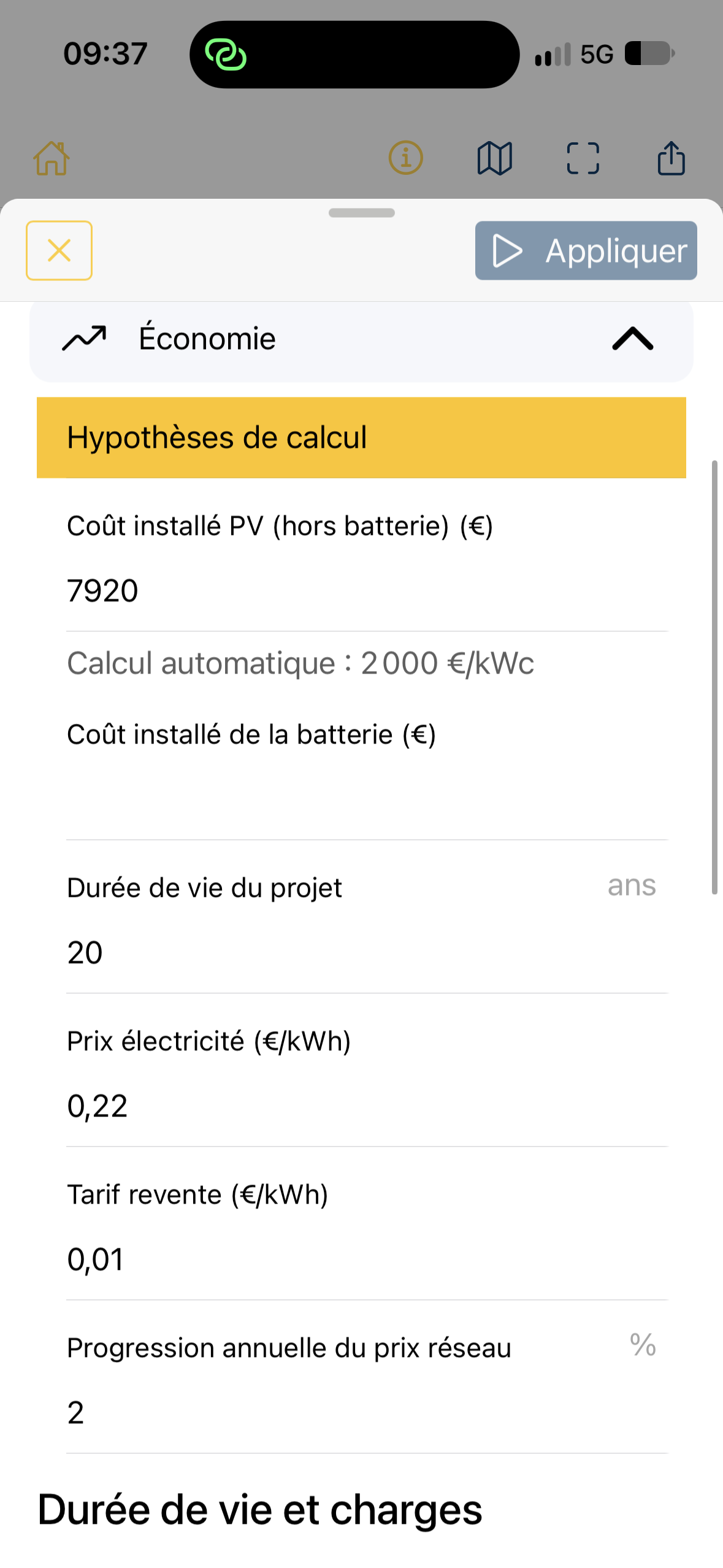
Installed PV cost, excluding battery
Section titled “Installed PV cost, excluding battery”Enter the cost of the PV system alone in the project’s selected currency. There are two behaviors:
- Automatic calculation: cost is derived from installed capacity using 2,000 currency units/kWp, or €2,000/kWp when the currency is euros. For example, 3.96 kWp gives an indicative cost of €7,920.
- Custom amount: a manually entered cost no longer follows later capacity changes automatically. Use Return to automatic calculation to restore that behavior.
This cost is a calculation assumption, not a contractual price. For an actual assessment, use a figure appropriate to the site and included services.
Installed battery cost
Section titled “Installed battery cost”When With battery is active, enter its installed cost. This is added to PV cost to obtain the PV + battery investment.
With automatic capacity sizing, check that the amount matches the capacity actually selected. If automatic capacity changes, the cost must remain consistent. When a battery is included but its installed cost is missing, energy analysis can still be calculated, but cost-dependent profitability indicators remain unavailable: total investment, IRR, payback, cumulative balance and related metrics.
Project lifetime
Section titled “Project lifetime”Set the financial assessment period in years. The engine’s default is 20 years. Mobile entry is limited to 1–40 years.
A longer period includes more production and savings, but may also include additional maintenance or replacements. Do not change it solely to inflate the financial result.
Electricity price (€/kWh)
Section titled “Electricity price (€/kWh)”The price of electricity purchased from the grid values the electricity the site no longer needs to buy thanks to self-consumption.
This is a tariff assumption, not a value automatically read from your contract. The applicable price depends on your offer and may include several tariff components.
Export tariff (€/kWh)
Section titled “Export tariff (€/kWh)”Enter the assumed payment for electricity exported and sold to the grid. It is different from the site’s electricity purchase price.
Depending on the contract, exports may not be paid this way or may use another tariff. Enter the value appropriate to your scenario; the screenshot is not a regulated tariff reference.
Annual grid price escalation (%)
Section titled “Annual grid price escalation (%)”This introduces an assumed annual change in the electricity purchase price over the assessment period. For example, 2% means the model projects a 2% annual price increase.
This assumption is particularly influential for self-consumption, because the value of avoided purchases follows electricity prices. The engine applies escalation from the second year, using initial price × (1 + rate)^(year − 1). Set export tariff escalation separately under Lifetime and operating costs.
Currency
Section titled “Currency”The Currency list selects the monetary unit displayed for the project, for example Euro (€). Check that all entered costs and tariffs use the selected currency. Choosing a currency does not guarantee automatic conversion of amounts already entered.
Apply and interpret
Section titled “Apply and interpret”After editing, tap Apply. Then review Economy, including the PV only / PV + battery comparison where a battery is included.
These settings cover only some assumptions. PV degradation, battery degradation, maintenance and replacements are covered in Set lifetime and replacements.
Points to check
Section titled “Points to check”- PV capacity, site consumption and battery capacity also affect calculations. Prices alone do not explain every economic difference.
- Project payback, IRR and end-of-period balance are separate indicators. See Understand the economic analysis.
- The €2,000/kWp value, 20-year period and screenshot tariffs are assumptions for this version or example, not verified commercial prices.